ARODOC's ARO-AI Intelligence at the Heart of Every Document
Welcome to the brain of ARODOC. ARO-AI* isn’t just smart it’s transformative. From reading your documents like a human to organizing them like a pro, ARO-AI turns your paper chaos into digital clarity.
*The Brains Behind Smart Document Digitization.
ARO OCR
ARO IDP
ARO PMS
ARO-OCR Turning Paper into Productivity
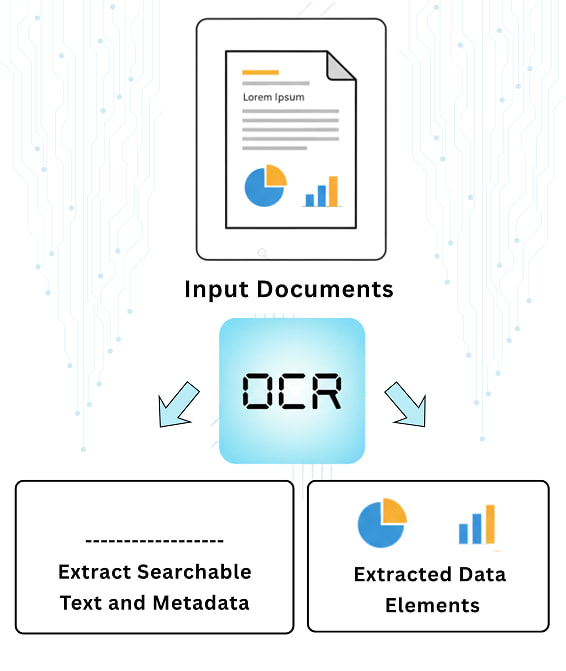
ARO OCR Explained
What OCR really does in ARODOC?
OCR is a game-changer. It doesn’t just “scan” it understands what’s written. Whether it’s a blurred invoice, a faded contract, or a scratch note, OCR can:
Reads Everything:
Bills, receipts, contracts, handwritten forms. No format is too tricky.
Handwritten to Digital:
Converts scribbles and signatures into machine-readable text.
Power Search:
Run full-text searches across thousands of pages in seconds.
Multilingual Mastery:
Reads regional languages, global scripts. No translation required.
OCR Usage
Why Industries Are Adopting OCR Like Never Before?
Because paper is expensive not just to store, but to process, search, and secure.
OCR slashes the time, cost, and human error involved in manual document handling. It boosts accuracy, speeds up workflows, and helps organizations of every kind become faster, smarter, and more compliant.
Whether you’re in finance, logistics, HR, legal, customer service, or admin ops, the story is the same.
- Used to spend hours searching files. Now it takes seconds.
- It reduced data entry time by 80%.
- Audit is No more a problem — everything’s searchable.
OCR isn’t just a tool. It’s a productivity revolution.
ARO OCR Intro
What is OCR (Optical Character Recognition)?
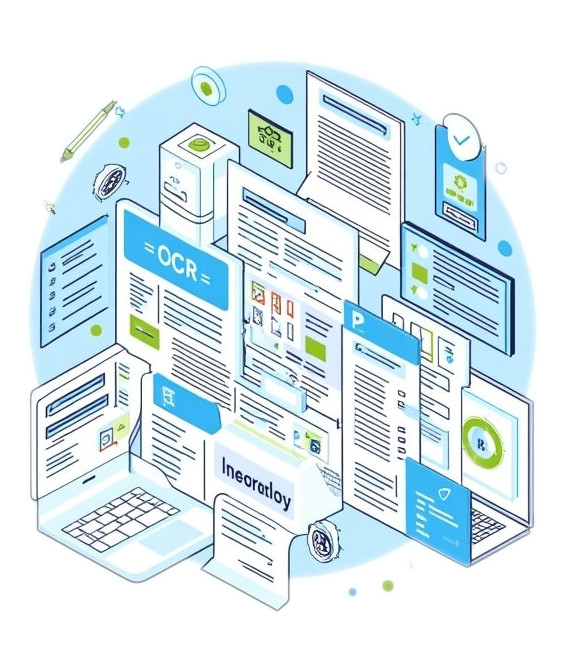
Ever felt like flipping through scanned PDFs trying to find a single invoice number? With ARO-OCR, you don’t have to. Optical Character Recognition is the silent superhero behind the scenes. It takes your scanned, handwritten, or printed documents and turns them into searchable, editable, and intelligent digital data — unlocking a whole new level of productivity across every industry. Scan a messy handwritten document and ARO-OCR converts it into a neat Excel sheet. Like magic, but real.
ARO-IDP The Brain Behind Your Business Documents
ARO IDP Explained
What is IDP (Intelligent Document Processing) ?
IDP is a Next-level smart engine. It uses AI and machine learning to understand, classify, and extract structured data from complex documents automatically. IDP helps your document get it understand, think, and act.
- Understands context, not just characters
- Learns from patterns, improves over time
- Integrates directly into your business systems
- Works across departments, file types, and workflows
IDP Brilliance
What makes it Brilliant in ARODOC?
It’s like having an AI-powered operations manager living inside your documents.
- Instantly read any invoice, contract, application, or email
- Understand what’s important (like the due date, PO number, or customer name)
- Sort and label it automatically
- Send it to the right team, tool, or folder without ever needing a coffee break
- Extracts key fields like vendor name, amount, due date, customer info.
- Integrates data with your ERP or document management system.
ARO OCR Intro
Why Industries Are Adopting IDP Like Never Before?
Companies using IDP don’t just work faster — they work smarter. Whether it’s invoices, KYC forms, on-boarding documents, insurance claims, or compliance reports, IDP turns chaos into clarity.
In the real businesses, documents come in all shapes and sizes — PDFs, handwritten forms, scanned letters, spreadsheets, emails with attachments. They’re messy, unstructured, and impossible to handle manually at scale.
That’s where IDP takes place, not just to digitize them but to make sense of them. It transforms how organizations think about documents from static files to dynamic, intelligent assets.
- No more bottlenecks.
- No more copy-paste fatigue.
- No more “where did that file go?”
ARO-PMS Where Process Meets Precision
The Workflow
What is PMS in ARODOC?
PMS (Process Management System) is your workflow command centre.
It tracks how documents move from creation to approval, from revision to archival ensuring every action is accountable, traceable, and timely.
Whether it’s onboarding employees, approving invoices, or managing client records, ARODOC’s PMS keeps every task flowing in order and under control.
The Brilliance
What Makes ARODOC’s PMS Brilliant?
End-to-End Workflow Automation – Set rules, define steps, assign roles — and let PMS handle the rest. From alerts to escalations, everything’s built-in.
Visual Process Tracking – See where every file stands in the pipeline. No more guessing who’s holding it up.
Integrated with OCR & IDP – PMS works hand-in-hand with ARO-AI to auto-route documents based on content, type, or department.
Customizable for Any Process – No matter how complex or unique your workflows are PMS adapts to fit your operations.
The Advanced Search & Metadata Tagging your new friend
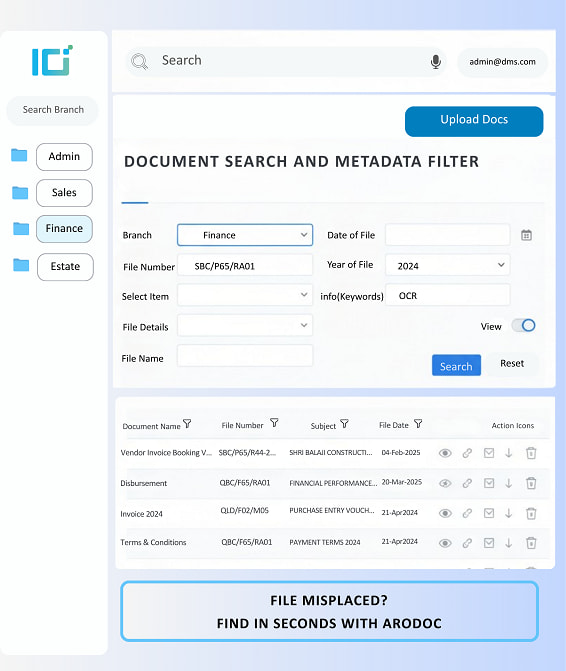
Advanced Search Explained
What is Advanced Search?
With ARODOC’s Advanced Search & Metadata Tagging, you don’t need to remember the exact file name, date, or even folder. Just remember anything—a keyword, department, project name, client ID and your document pops up like magic!
Search Brilliance
What makes it Brilliant in ARODOC?
It is a Total Time-Saver. This feature is like giving your document system a GPS, a memory boost, and a sixth sense — all in one.
With Advanced Search:
- You can search by keywords, content inside the document, date ranges, tags, file types, or even the uploader’s name.
It’s like having Google for your document repository — but laser-focused on your data.
With Metadata Tagging:
- Every file gets smart, searchable labels — like “Invoice,” “Customer Data,” “Legal,” or “Q1 Budget.”
- These tags transform your system into a fully indexed, self-organizing library that knows what everything is, and where it belongs.
Importance
Why it matters to various Industries
Across all sectors from finance to retail, logistics to legal, one challenge remains the same.
“We have the data. We just can’t find it when we need it.”
That’s why industries are embracing Advanced Search & Metadata Tags like a lifeline:
- Speed Over Chaos: In fast-paced sectors like healthcare, manufacturing, or finance, quick access to documents can impact service, compliance, or even lives.
- Smarter Workflows: Teams stop wasting time on ‘document treasure hunts’ and focus on real work.
- Audit-Ready at All Times: No need to panic when a regulator knocks. Find any record in moments.
- Seamless Collaboration: When teams across departments can search and filter the same way, work just flows.
- Custom Control: Every industry has unique terms, projects, or document types. Custom tagging ensures everything is filed in a way that makes sense to you.
Whether it’s a policy file, a shipping manifest, a resume, or a blueprint — this feature makes retrieval a breeze and confusion a thing of the past.
Customizable Workflow Automation
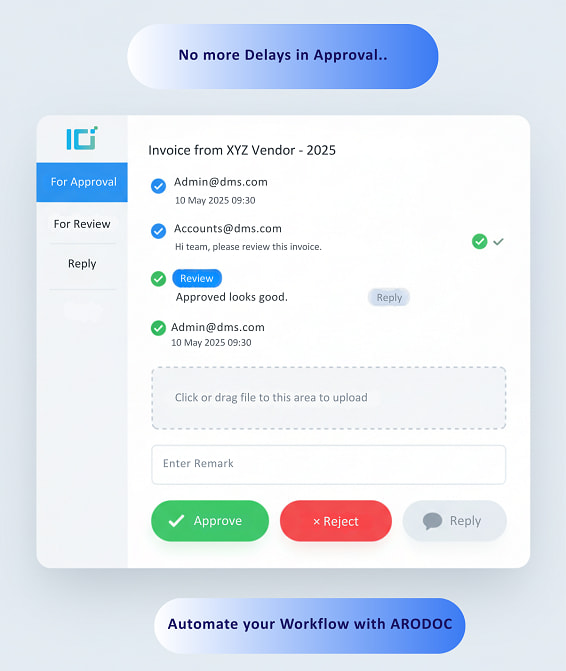
Explanation
What is Workflow Automation?
Design and automate document approval processes, routing, and notifications, ensuring tasks are completed efficiently and on time.
It Create document approval chains. Notify the right people automatically. No manual follow-ups or Excel trackers required.
The Brilliance
What makes it Brilliant in ARODOC?
Welcome to the world of Customizable Workflow Automation where your processes finally work for you, not against you.
With ARODOC’s workflow engine:
- Define your workflow — from simple approvals to complex multi-level routing
- No more bottlenecks — documents flow automatically
- No more chasing — automatic reminders and escalations
- Full visibility — who approved what, when, and why
Importance
Why it matters to various Industries?
Whether you’re in finance, HR, legal, operations, or logistics, your work is built on processes.
And when those processes are automated, customizable, and trackable, you gain:
- Clarity — no ambiguity on who does what, when
- Efficiency — teams move faster with fewer errors
- Focus — your people stop managing the process and start doing the real work
- Control — nothing moves forward without your rules
This is why everyone from start-ups to large enterprises is embracing document automation like never before.
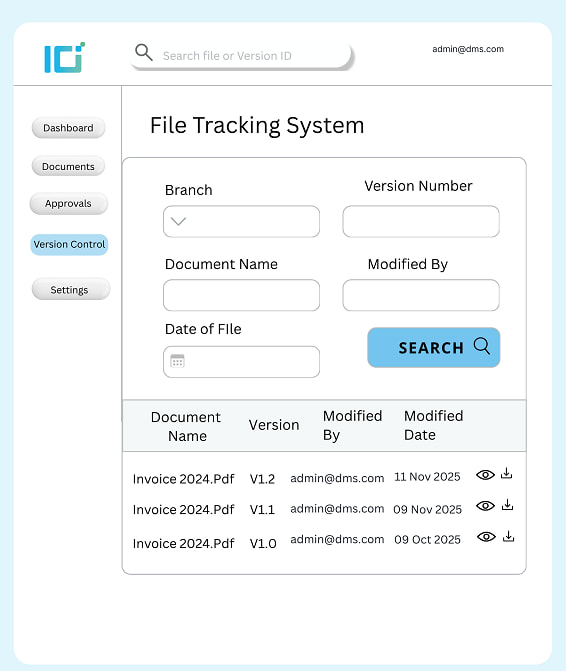
Robust Version Control
Explanation
What isVersion Control?
Documents evolve they go through edits, approvals, feedback loops, and multiple hands. Without version control, things get messy.
With Robust Version Control, there’s one source of truth, and everyone knows where to find it. No guessing. No duplication. No panic.
The Brilliance
What makes it Brilliant in ARODOC?
ARODOC’s Robust Version Control feature tracks every single change, keeps all historical versions, and lets you roll back, review, and restore at any time.
With this feature, you can:
- See who made each change (with timestamps and notes)
- Compare versions side-by-side
- Restore previous versions instantly
Prevent overwrite errors with check-in/check-out functionality
Importance
Why it matters to various Industries?
Across sectors like legal, finance, HR, construction, healthcare, and R&D, documents are living assets.
And the ability to manage their lifecycle — securely, accurately, and transparently — is non-negotiable.
Version Control helps in:
- Full document history with every saved version
- Side-by-side comparisons to spot even minor changes
- Smart check-in/check-out to prevent overwriting
- One-click version rollback
- Secure, centralized document tracking
Granular Access Permission
Explanation
What is Granular Access Permission?
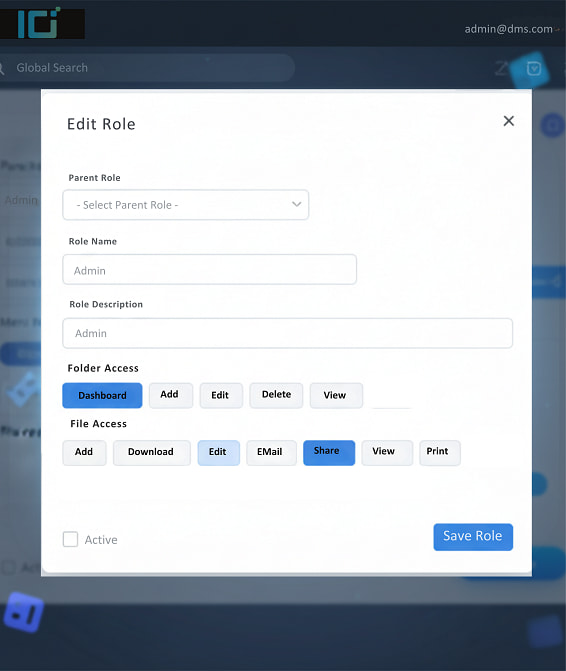
In the world of document management, access control isn’t just security—it’s sanity. ARODOC’s Granular Access Permissions put you in complete command of who sees what, and when.
Granular Access Permission in ARODOC means you can control who can do what—down to the tiniest detail.
Whether it’s viewing a document, editing a file, sharing it externally, or deleting it altogether, ARODOC gives you the power to customize access by user, department, role, document type—even within a time limit.
This isn’t just security—this is digital discipline.
The Brilliance
What makes it Brilliant in ARODOC?
ARODOC doesn’t stop at just locking or unlocking a document. It gives you a remote, multi-function key.
- Set Access by Roles & Users – Assign permissions to individuals or create reusable templates like “HR Staff”, “External Vendors”, “Finance Managers”, etc.
- Every Action in Hand – Allow users to only view, edit, print, share, or comment. Block them from everything else.
- Time-Bound – Grant access for a specific period—1 day, 1 week, or until the project ends.
Importance
Why it matters to various Industries?
Granular Access isn’t a “nice-to-have.” It’s a must-have—especially when you’re dealing with sensitive, confidential, or regulatory data.
- Eliminates accidental data leaks
- Maintains internal confidentiality
- Strengthens audit-readiness & compliance
- Builds user trust and improves focus
- Reduces dependency on IT/admin teams
Whether you’re a start-up, a hospital, a school, or a ministry, ARODOC ensures your documents are seen by the right eyes only.
“You control the lock. ARODOC hands you the master key.”
Audit Trails
With ARODOC every move is monitored, logged & traceable with timestamps, usernames & actions recorded.
Explanation
What is Audit Trail?
Unlike basic systems that only track open and close actions, ARODOC gives you fine-grained, event-level monitoring.
Every Action Tracked- File viewed, File downloaded, File edited or renamed, File shared or File deleted or moved or printed.
The Brilliance
What makes it Brilliant in ARODOC?
- Eliminates the blame game
- Builds internal accountability
- Ensures compliance with industry standards
- Speeds up investigations
- Protects intellectual property
Importance
Why it matters to various Industries?
- Monitors who accessed patient records and when
- Tracks legal document edits and approvals
- Ensures exam papers or student data weren’t leaked
Cloud Security
Explanation
What is Cloud Security?
Every file, form, and folder is protected with advanced cloud encryption, access control, and 24/7 threat monitoring, powered by our trusted partner, Amazon Web Services (AWS).
Whether you’re working remotely, sharing documents with teams, or accessing files on the move — ARODOC keeps everything protected, private, and under your control with cloud security.
The Brilliance
What Sets it apart in ARODOC?
- Compliance with ISO 27001, ISO 9001, ISO 20000
- Partnered with AWS – The Global Leader in Cloud Infrastructure
- Granular Permissions & Role-Based Access
- Audit Trails & Activity Logs
- Automatic cloud backups and
Importance
Why it matters to various Industries?
For All Industries – One Common Need: Trust
ARODOC’s Cloud Security ensures:
- Legal teams stay compliant with privacy laws
- Healthcare organizations protect patient data under HIPAA
- Financial teams meet audit, retention, and data governance needs
- Enterprises collaborate securely across locations and teams
- Government and public sectors ensure national data privacy standards
ARODOC + AWS: Your Documents. Secure. Compliant. Always Accessible.
